
Before choosing a B2B data provider, it’s worth understanding both its strengths and shortcomings. Lusha has been a popular tool for prospecting. There are already many Lusha reviews out there, but most of them provide limited information.
We bring you a complete Lusha review, covering its functionality, pricing, benefits, and limitations, while also examining recent feedback from its users.
Lusha Overview
Lusha is a B2B prospecting platform built for sales professionals to find contact information, company data, buyer intent signals, and lead intelligence. The platform has built a reputation around its Chrome extension, which reveals contact details directly on LinkedIn profiles.
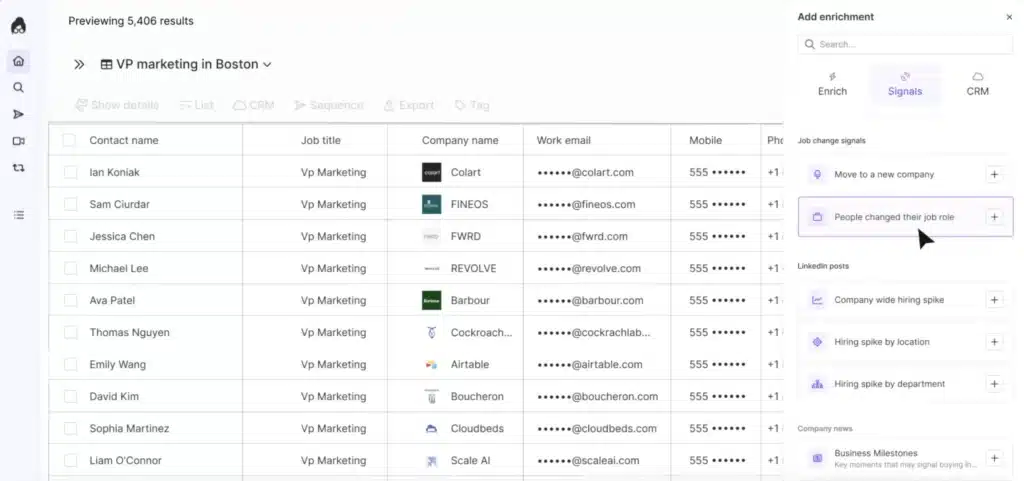
Over the years, Lusha has evolved beyond simple contact discovery. The tool now also includes AI-powered prospect recommendations, enrichment capabilities, and buyer intent data.
Lusha Pros
- The Chrome extension requires zero training. Install it, click a button, and you get contact information instantly;
- Phone number accuracy hits around 90% for US and UK contacts, according to user reports;
- Buyer intent signals help identify active prospects;
- Works seamlessly with Salesforce, HubSpot, and other major CRMs;
- Large database of business contacts;
- You get notified when decision-makers move to new companies.
Lusha Cons
- The credit system is painful. Lusha charges credits for each piece of data;
- Coverage drops significantly outside North America and the UK;
- Trustpilot reviews mention unexpected auto-renewals and difficulty canceling;
- Multiple reviewers mention finding outdated contacts who’ve left their companies or retired;
- Limited bulk extraction capabilities compared to some competitors.
Lusha Reviews
The Lusha reviews on g2 shows a rating of 4.3/5 from over 1656 reviews.
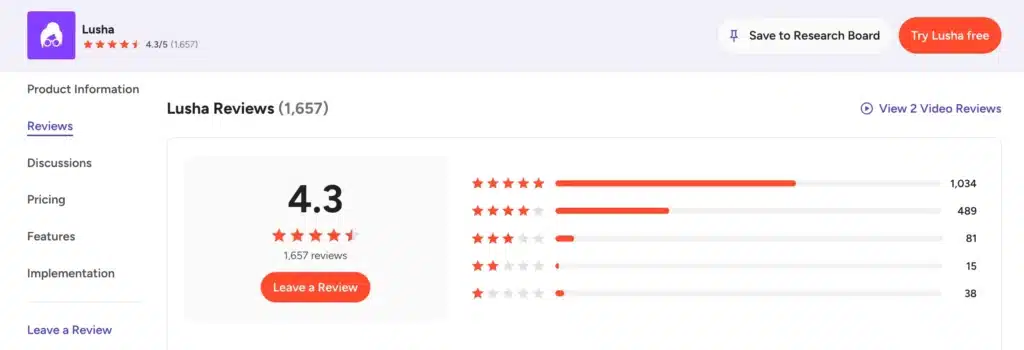
Users praise the easy setup and the Chrome extension. Some customers say data freshness is a problem. We also saw complaints about credit depletion and regional data gaps.
On Capterra, Lusha scores 4.0 out of 5 based on 398 reviews.
Users praise the platform’s UI, search functionality, and ability to quickly find business contacts. However, recurring complaints mention outdated data, pricing concerns, and limitations when exporting larger contact lists.
We also checked Lusha reviews on Trustpilot where it has a rating of 1.2/5 based on 759 user feedback.
The sentiment is considerably less favorable. Many reviewers express concerns about data accuracy, customer support responsiveness, billing issues, and privacy-related complaints.

Lusha Features
Lusha has a range of features beyond basic contact lookup.
We’ll cover Lusha’s core features.
Workspace
Consider the Workspace feature as Lusha’s central command center. From a single dashboard, you can organize accounts, manage prospect lists, monitor activities, and coordinate outreach.
This feature is useful as it helps sales reps avoid switching between multiple tools. Managers can also gain visibility into prospecting activities and pipeline development. But it doesn’t replace a real CRM.
Chrome Extensions for Contact Data Extraction
The Chrome extension is Lusha’s frontline feature. You install the extension, and then when you visit a LinkedIn profile, a small icon appears. You click it, and Lusha reveals contact data.
Besides LinkedIn profiles, the extension also works on company websites, Sales Navigator, and various online directories. When viewing a prospect, Lusha can show business emails, phone numbers, company details, and other contact information.
For many users, this feature alone justifies using the platform because it significantly reduces manual research time. But you must burn credits every time without any guarantee of data accuracy.
Built-in Workflows
Sales teams often waste hours moving data between systems.
Lusha addresses this problem through built-in workflows that automate prospecting tasks. Users can create lead lists, trigger actions, enrich records, and route data into CRM systems with fewer manual steps.
This functionality helps maintain cleaner pipelines while reducing administrative work.
Job-Change Updates & Buyer Intent Signals
Lusha monitors millions of companies and alerts you when key contacts change jobs. This is genuinely useful. If a decision-maker moves to a new company, you can reach out early. Many decision-makers may reassess vendors after joining a new organization.
Buyer intent signals work similarly. The platform identifies prospects who are researching topics relevant to your business. It provides a nice extra layer of context, helping you prioritize accounts showing stronger purchasing interest.
AI Prospect Recommendations
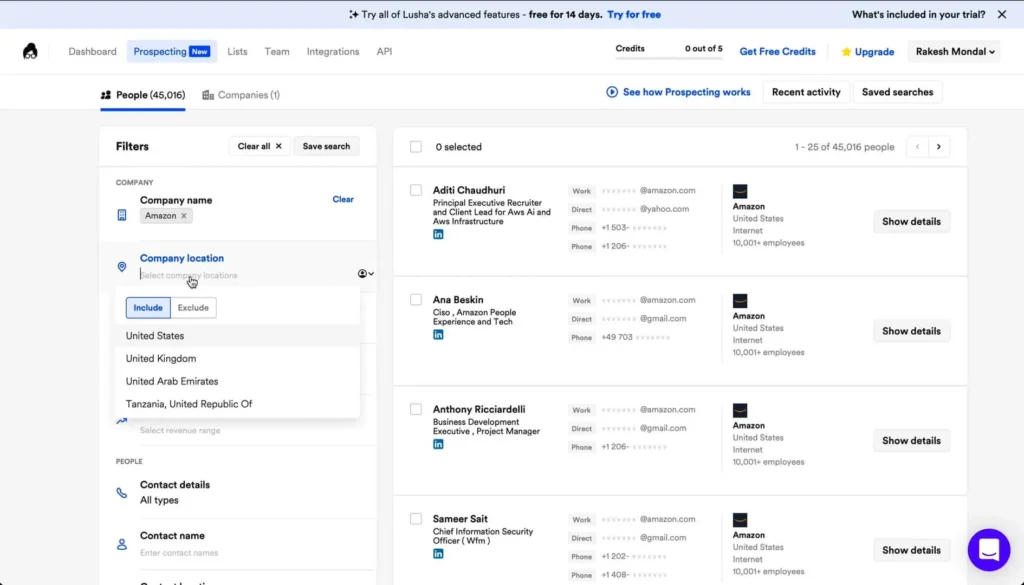
Once you identify ideal prospects, Lusha’s AI suggests similar contacts based on role, company attributes, and behavioral signals.
While it helps expand your pipeline beyond initial searches, the quality varies. Sometimes the suggestions are spot on. Other times, they miss the mark. This feature is helpful for expanding your pipeline, but it’s not a good idea to rely on it exclusively.
Data Enrichment
You can upload a list of contacts, and Lusha will enrich it with missing information, such as email addresses, phone numbers, and company details. It fills the gaps, helping teams to improve CRM accuracy without manually researching every lead.
The enrichment happens in bulk, which is convenient. Depending on your plan, you can enrich 300 to 10,000 rows at once.
However, the accuracy issues apply here too. Some enriched contacts will be wrong. You won’t know until you try them.
AI-Powered Conversation Intelligence
Conversation intelligence helps sales teams understand what happens during prospect interactions.
Lusha uses AI to analyze conversations, identify trends, surface insights, and help teams improve messaging. The AI tracks talk-to-listen ratios, spots keywords, and highlights customer pain points.
This is a nice addition for teams that do a lot of phone outreach.
Managers can review patterns across calls and meetings while identifying coaching opportunities for representatives. You also get better visibility into sales performance and customer engagement.
Integration
Lusha integrates with major CRMs and sales tools, including Salesforce, HubSpot, Microsoft Dynamics, Pipedrive, Salesloft, and others. You can push contacts directly into your CRM with one click.
API access is available on higher-tier plans for custom integrations.
The integration is solid. It keeps data synchronized across systems and reduces manual updates. For teams that live in their CRM, this is a vital element of Lusha’s value.
Lusha Price & Subscription Plans
Check the Lusha pricing table below.
| Plan | Monthly Price (Billed Monthly) | Monthly Credits | No. of Seats |
|---|---|---|---|
| Free | $0 | 40 | 1 |
| Starter | $49.9 | 400 | 1 |
| Pro | $69.9 | 600 | 2 |
| Premium | $399.9 | 3400 | 5 |
| Scale | Custom pricing | Custom credits | Custom seats |
One important thing to understand is Lusha’s credit-based model. Contact reveals, enrichments, and other activities consume credits. As prospecting volume increases, teams may need additional credits or higher-tier plans, which can significantly increase overall costs. Several users specifically mention pricing and credit limitations when discussing the platform.
A phone number reveal can cost 5 credits. An email reveal might cost 1 credit. So your 40 credits get you maybe 8 phone numbers.
Best Alternative to Lusha
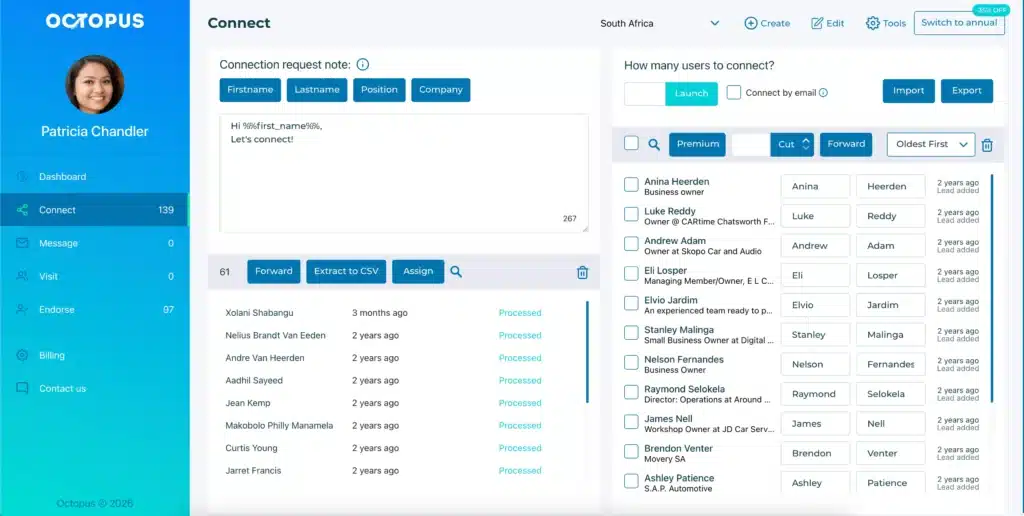
The biggest issues with Lusha are the absence of LinkedIn outreach and automation features, credit limits, pay-per-contact pricing, and questionable data accuracy. Octopus CRM is the best Lusha alternative as it enables full LinkedIn automation at a monthly flat and affordable price.
Though there are countless Lusha alternatives, it is best for you to pick Octopus if LinkedIn is your primary prospecting network.
The Octopus CRM LinkedIn automation tool allows you to automatically find prospects, send them personalized connection requests and messages, endorse skills, and even create a fully automated marketing funnel.
Octopus CRM’s LinkedIn automation Chrome extension sits inside your browser, making it super easy to launch and run campaigns.
More reasons why Octopus CRM works better for sales teams:
- Lusha just gives you data, but Octopus CRM automates the entire outreach process;
- Octopus CRM includes a built-in CRM;
- Users can message hundreds of first-degree connections automatically;
- You can set up drip campaigns with smart delays and personalized content;
- Bypasses LinkedIn’s weekly invite limit by sending requests through email;
- Monitor acceptance rates, response rates, and social selling index;
- Octopus CRM never asks for your LinkedIn credentials. Built-in activity control detects excessive activity and pauses automation to protect your account;
- Integrates with Zapier, HubSpot, and Google Docs.
For teams that rely on LinkedIn for prospecting, Octopus CRM is hands-down the best Lusha alternative.