
If you’ve been reading Closely reviews, you’ve probably noticed mixed opinions. Some users appreciate its all-in-one approach to prospecting and outreach, while others wonder whether they really need every feature or if a simpler solution would work better.
Choosing a sales automation platform isn’t easy. Every vendor says they’ve got the right tool for you, which only makes the decision more confusing. On top of that, new tools appear more often, AI features keep expanding, and pricing changes often.
So, how do you know whether Closely deserves a place in your sales stack?
We wrote this honest Closely review to critically examine the platform, covering its pros and cons, features, pricing, and best alternative.
Closely Overview
Closely started in 2020 as a LinkedIn automation tool. Since then, it has expanded into a broader outbound platform with LinkedIn automation, email sequencing, data enrichment, and AI agent capabilities.
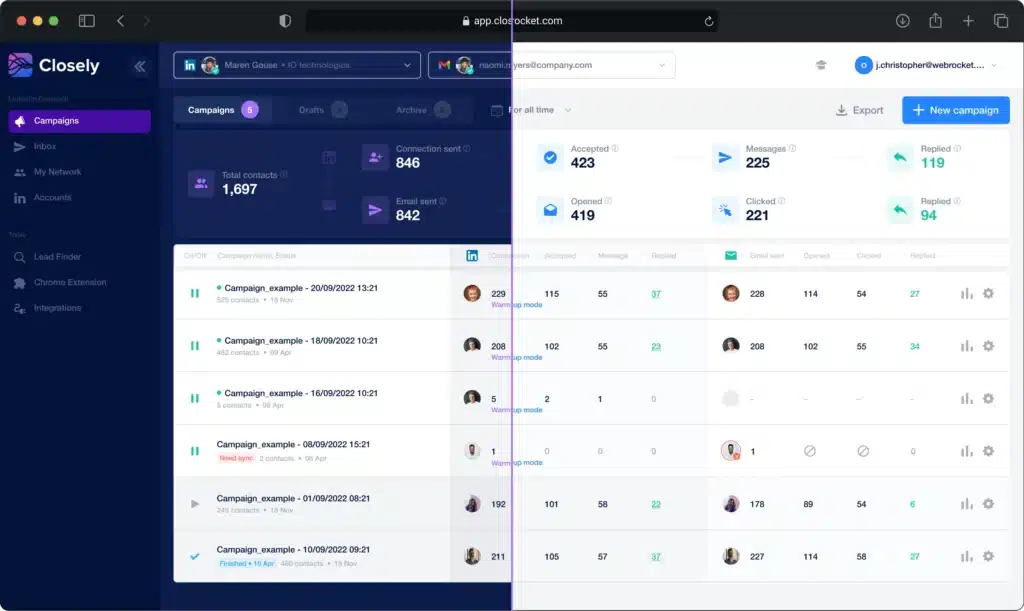
The company behind Closely says their solution automates the busywork for individual sellers, founders, agencies, marketers, and recruiters.
But does every business or sales team need such a broad feature set? Or would a simple yet more specialized LinkedIn automation tool deliver better value? The answer depends on your workflow, budget, and outreach strategy.
Closely Pros
- Combines LinkedIn automation, email outreach, and data enrichment in one tool;
- AI sales agents help automate prospecting activities;
- Human-like delays help protect your LinkedIn account from bans;
- Includes a large B2B contact database with enrichment capabilities;
- Users get a unified inbox for managing conversations.
Closely Cons
- Email limits on lower-tier plans restrict high-volume campaigns;
- Plans start at $49 per month for a single LinkedIn account without data enrichment and AI personalization;
- The wide range of features creates a steeper learning curve for new users;
- If your prospects are mainly on LinkedIn, you may end up paying for features you don’t need.
Closely Reviews
We looked at Closely reviews on g2 where it has a 4.6/5 rating from 196 verified users.
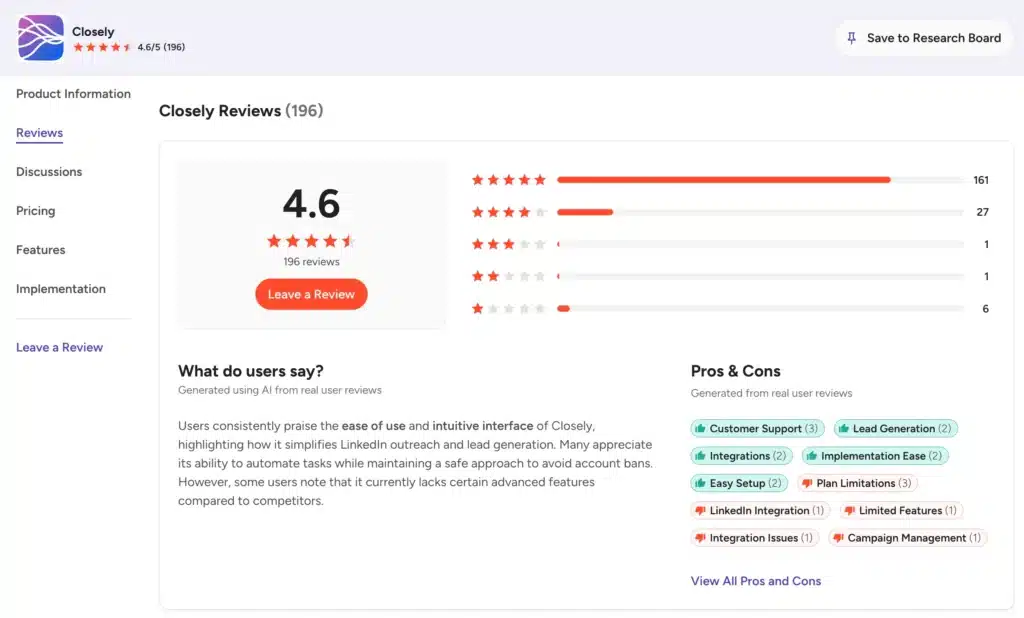
Users appreciate the intuitive interface and all-in-one outbound workflow. A few reviewers, though, did report integration challenges and plan limitations. Others highlighted that some advanced features still lag behind competitors.
At the time of writing this review, Closely doesn’t have a Capterra profile. Many sales teams use Capterra as part of their software evaluation process, so its absence means you’ll need to rely on other sources for customer feedback and product comparisons.
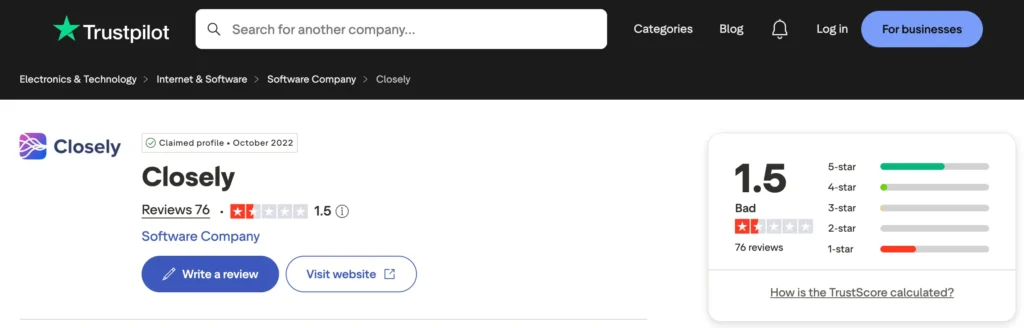
According to reviews on Trustpilot CloselyHQ rates 1.5 out of 5 from 76 reviews, with 59% five-star and 33% one-star.
The one-star reviews cluster around the same complaint: a cancellation window that catches people off guard, difficulty unsubscribing, and pricing.
Closely Features
Closely packs a lot of functionality into one platform.
We’ll look at the features of Closely so you can make an informed decision.
Data Enrichment
Closely’s enrichment engine pulls real-time data from over 30 sources. It verifies business emails, finds phone numbers, and grabs job titles, company data, and buying signals.
The platform uses a waterfall enrichment system. If one data source fails, another takes over instantly. Closely claims match rates above 95% for B2B lead generation.
This feature is vital for building prospect lists from scratch. Instead of manually searching for email addresses or phone numbers, you let the tool do it. The enriched data then feeds directly into your outreach sequences.
AI Sales Agents
Closely automates prospect research, ICP qualification, and message personalization through AI sales agents.
The agents automatically match each lead against your ideal customer profile based on industry, company size, and location. Plus, they run real-time company research, pulling insights like tech stack, hiring activity, and buying signals from the web.
For messaging, the AI generates personalized cold emails and follow-ups based on company insights and LinkedIn data. Closely claims this leads to 2x more meetings booked with qualified leads.
LinkedIn Automation
LinkedIn automation remains one of Closely’s core capabilities. The platform automates repetitive actions, including profile visits, connection requests, follow-up messages, and prospect management.
You can extract leads from LinkedIn search, Sales Navigator, Recruiter, posts, groups, and CSV files. Then run sequences comprising connection requests, profile views, follow-ups, and auto-pauses when someone replies.
Plus, users can customize campaigns with delays, personalization, and audience filters to create more natural outreach flows.
Multichannel Outreach
Users can build outreach sequences in Closely that alternate between LinkedIn and email channels.
For example, send a connection request, wait three days, and if ignored, trigger an email follow-up.
The main limitation here is the daily email send cap on entry-level plans, which bottlenecks scaling for growing teams. And if your target audience is primarily on LinkedIn, you end up paying for email infrastructure you don’t need.
Unified Inbox
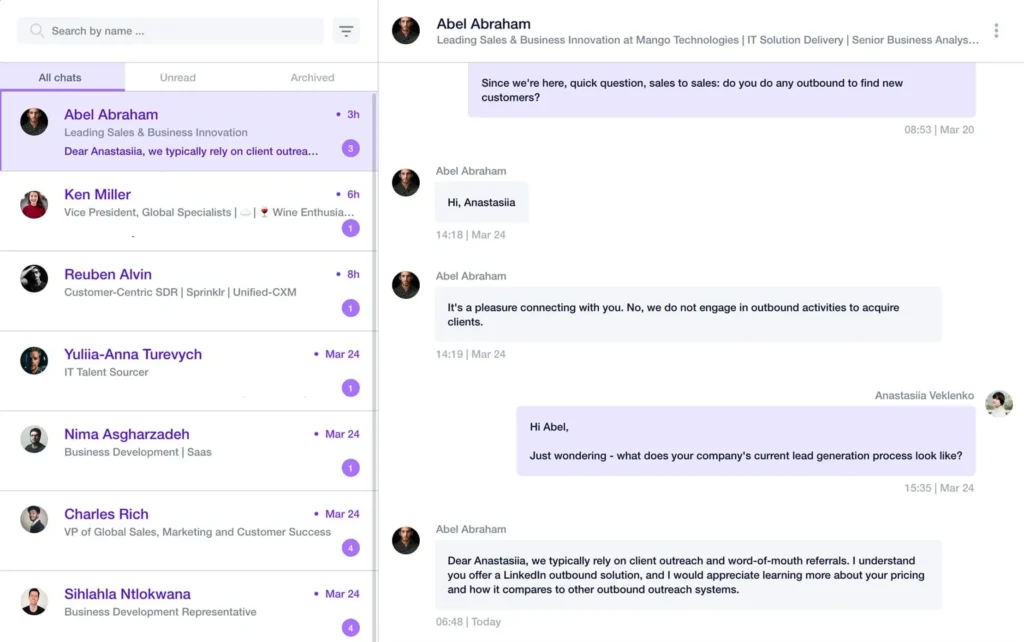
The unified inbox brings LinkedIn DMs, InMails, and email replies into one feed. You can assign conversations to team members, use tags and templates, and prevent collisions with teammate presence.
This is useful for teams. Instead of switching between LinkedIn and email tabs, everything appears in one place. You can also sync outcomes to HubSpot, Salesforce, or Pipedrive.
Insights Dashboard
Closely’s Insights Dashboard provides campaign metrics that help users monitor outreach performance over time.
Depending on the campaign, you can review activity levels, response rates, engagement trends, and other performance indicators from a single dashboard. It helps you identify which campaigns generate conversations and where adjustments may improve results.
The reporting tools are especially useful for agencies and larger sales organizations managing multiple campaigns simultaneously.
Help Center & Community
Documentation is solid. Clear, English-only guides covering setup and integrations.
Support depends on your plan, though. The Starter plan gets support chat with a multi-hour response window, while the Essential plan includes a dedicated success manager.
Integrations
Closely integrates with HubSpot, Salesforce, and Pipedrive. These integrations auto-sync DMs, InMails, connection events, and replies to contact, account, and deal timelines.
The platform also supports webhooks for custom integrations. This gives you flexibility if you use less common tools.
Integration depth varies. Some users report that sync works well for basic data but may require additional configuration for complex workflows.
Closely Price & Subscription Plans
Check the Closely pricing table below.
| Plan | Monthly Price(billed monthly) | LinkedIn Accounts | Monthly Credits |
|---|---|---|---|
| Starter | $49/month | 1 | — |
| Growth | $127/month | 3 | 3,000 |
| Essential | $205/month | 5 | 5,000 |
| Custom | Custom pricing | Custom | Custom |
Closely operates on a credit-based model for certain features. Credits cover email lookups, phone number discoveries, and AI personalizations. Annual billing saves you roughly 30-40% compared to monthly payments.
Best Alternative to Closely
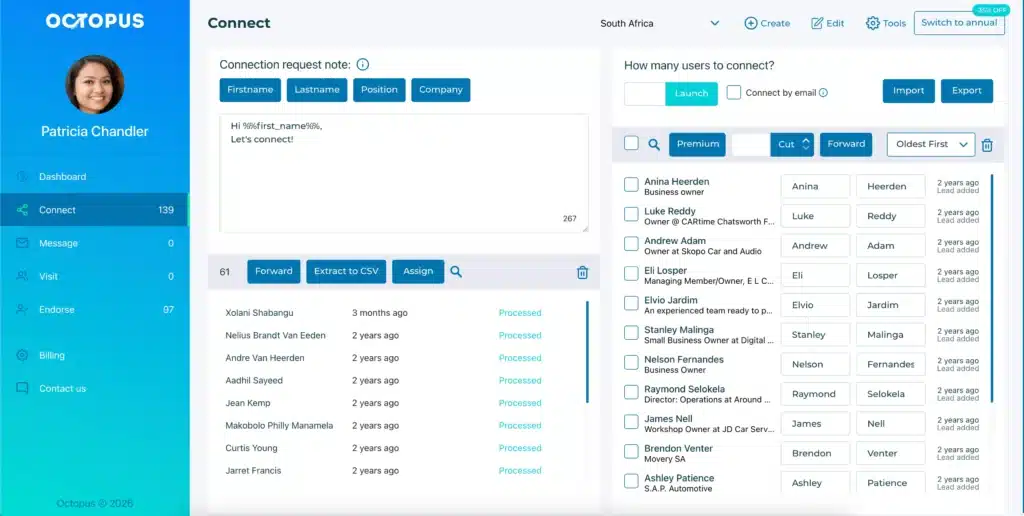
If you’re looking for a simpler or more cost-effective LinkedIn automation tool, Octopus CRM is a leading choice. It’s a perfect solution for individual users, teams, and recruiters who want a dependable LinkedIn outreach software without paying for email features, AI agents, enrichment engine, and contact databases.
While you may find many Closely alternatives, Octopus CRM is a frontrunner for certain compelling reasons.
Octopus CRM is a LinkedIn automation Chrome extension, meaning users need no separate app to learn or no cloud dashboard to configure from scratch. Install the extension, connect your LinkedIn account, and build campaigns straight from your browser. It works across all types of LinkedIn accounts, including free, Sales Navigator, and Recruiter Lite.
Octopus CRM packs a solid set of features, allowing users to:
- Automate LinkedIn profile visits, connection requests, follow-up messages, and skill endorsements;
- Build personalized outreach sequences with custom delays between actions;
- Send personalized messages in bulk, create campaigns, and build simple lead generation funnels;
- Manage campaigns through an intuitive dashboard;
- Export lead data to CSV for reporting or CRM workflows;
- Use built-in analytics to monitor campaign performance and outreach activity;
- Access an integrated CRM to organize leads throughout your sales pipeline;
- Connect with popular CRM systems through native integrations and Zapier;
- Personalize messages with dynamic variables to create more relevant conversations;
- Ensure your LinkedIn account is safe with the activity control feature that alerts you to excessive activity;
- Pay a flat monthly fee starting at $6.99/month (billed annually). No worrying about hidden charges or running out of credits.